Switch
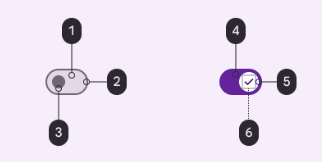
- 1: Surface Container
- 2: Outline
- 3: Outline
- 4: Primary
- 5: On primary
- 6: On primary container
Switches toggle the selection of an item on or off
Use switches (not radio buttons) if the items in a list can be independently controlled
Switches are the best way to let users adjust settings
Make sure the switch’s selection (on or off) is visible at a glance
States

- 1: Enabled
- 2: Disabled
Specs
Enabled
Details
Container
| Token | Value |
|---|---|
| ds.comp.switch.trackColor | ds.sys.color.primary |
| ds.comp.switch.handleColor | ds.sys.color.surfaceContainer |
| ds.comp.switch.iconColor | ds.sys.color.primary |
Disabled
Details
Container
| Token | Value |
|---|---|
| ds.comp.switch.trackColor | ds.ref.palette.neutral._70 |
| ds.comp.switch.handleColor | ds.sys.color.surfaceContainer |
| ds.comp.switch.textColor | ds.sys.color.surfaceContainer |
React Native
<Switch value={boolean} onValueChange={() => boolean} disabled={boolean} />
Props
| Prop | Type |
|---|---|
| value | boolean |
| onValueChange (optional) | (event: GestureResponderEvent) => void |
| disabled (optional) | boolean |