Layout
The Design System currently support mobile devices only.
Units
The width of reference used in Figma for the designs is 360dp.
All the units are converted proportionally to this width. For example: if the width of the real device is 720dp and we have in Figma
a 10dp padding, it will be converted to 20dp in the real device. This conversion is made in code with the rv function.
The minimum supported proportional height (proportional to 360dp width) is 600dp and the maximum is 880dp.
This covers a vast range of device resolutions:
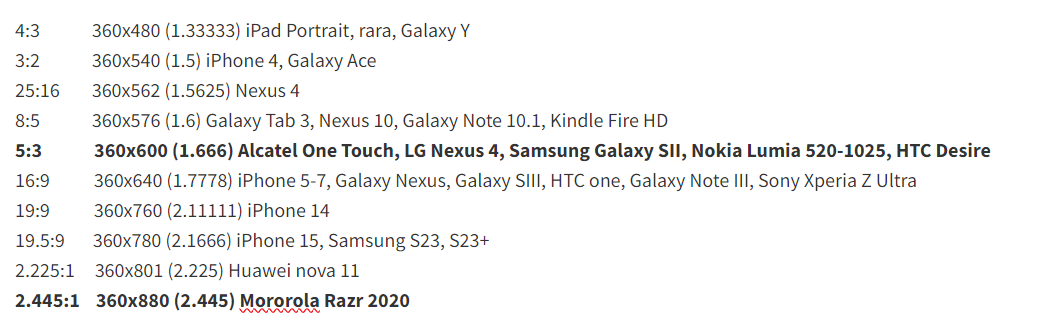
The Design token's units in dp correlates to pixels in Figma with a width of 360px.
Spacing
Margins
Margins are the spaces between the edge of a window area and the elements within that window area.
Margins are 16dp from the left and right edge of the window.

Padding
Padding refers to the space between UI elements. Padding can be measured vertically and horizontally and does not need to span the entire height or width of a layout. Padding is measured in increments of 4dp.

When multiple elements are stacked vertically within a component, use 4dp increments to separate them. Center the grouped element within the component container.